Document Comparison & Compliance Reporting
Why Document Comparison is Needed?
Organizations frequently manage multiple versions of contracts, policies, financial documents, and compliance reports. These documents often contain complex clauses, calculations, and regulatory requirements.
Manual comparison poses challenges:
- Time-Consuming: Reviewing large documents line by line slows audits and approvals.
- Error-Prone: Human reviewers may overlook small but critical differences.
- Compliance Risks: Missed discrepancies can lead to regulatory exposure and financial penalties.
With increasing documentation volumes and stricter regulatory requirements, manual review is no longer sustainable. Companies need an AI-powered, automated approach that ensures accuracy, speeds up audits, and provides clear insights into document changes.
Our Agentforce-Powered Solution
We built an intelligent solution by integrating Salesforce with Agentforce Generative AI to automate compliance document comparison.
The System:
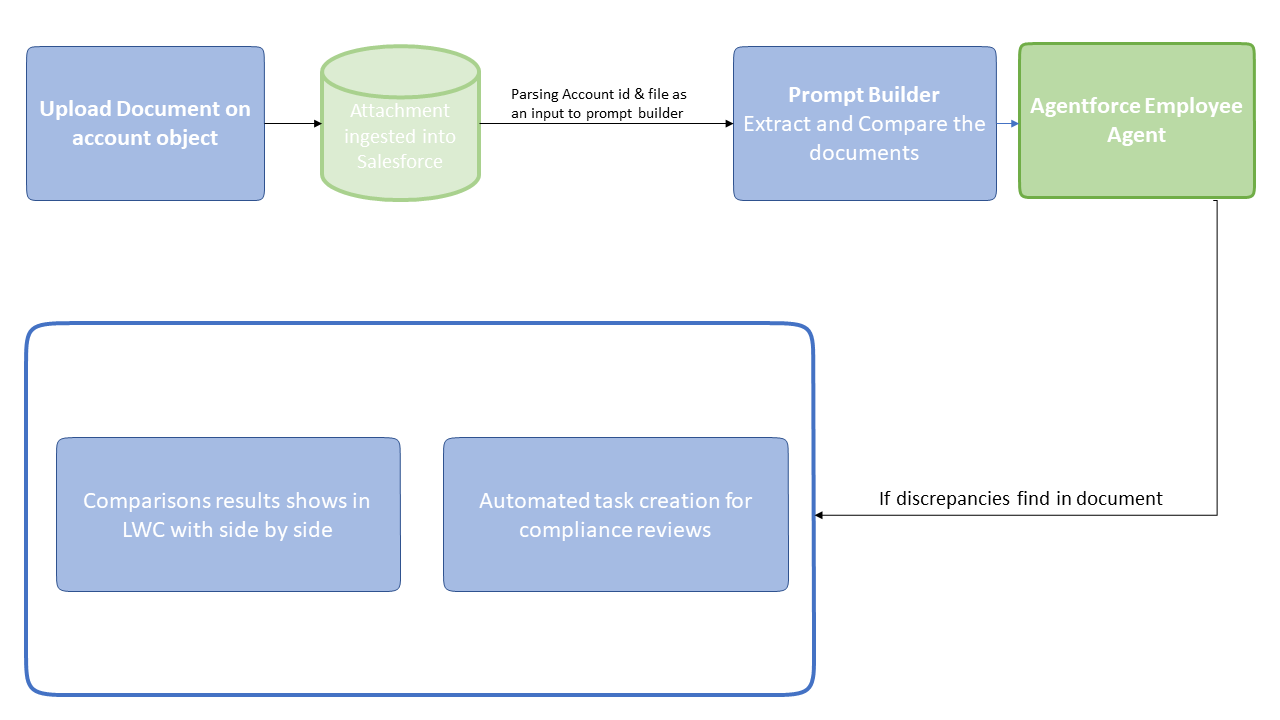
- Uploads & ingests: compliance documents directly in Salesforce.
- Analyzes: terms, clauses, and financial data using Prompt Builder templates.
- Compares: multiple documents to highlight discrepancies.
- Generates insights: with side-by-side and narrative summaries.
- Triggers automated actions: such as tasks, approvals, and escalations within Salesforce workflows.
This ensures accuracy, accelerates compliance checks, and reduces the burden on compliance teams.
Key Features
1. Document Upload & Ingestion
- Compliance or financial documents (PDFs, policies, terms) uploaded securely to the Account record in Salesforce.
- Content extracted and prepared for AI analysis.
2. Contextual Analysis with Prompt Builder
- Comparison Prompt Template: Highlights discrepancies across versions.
3. Agentforce Employee Agent
- Uses Salesforce + Data Cloud context to perform document-to-document comparisons.
- Identifies mismatches, missing clauses, or financial inconsistencies.
4. Automated Discrepancy Detection
When differences are detected:
- A compliance review task is created automatically.
- Notifications and approvals are triggered for quick resolution.
5. User-Friendly Results in Salesforce
- A Lightning Web Component (LWC) displays side-by-side document views.
- Highlighted differences make it easy for compliance officers to review without reading entire documents.
Business Impact with Agentforce
- Automated Comparison: Eliminated manual reviews by automatically detecting differences.
- Higher Accuracy: Reduced errors in audits and compliance checks.
- Faster Review Cycles: Shortened document verification timelines.
- Stronger Compliance: Ensured consistent validation of contracts and policies.
- Operational Efficiency: Freed compliance teams from repetitive tasks.
- Time Savings: Cut review and processing efforts significantly.
- Actionable Insights: Side-by-side and summary comparisons for quick decision-making.
- Seamless Workflow Integration: Embedded in Salesforce with auto-tasks, notifications, and escalations.
Functional Flow Diagram: